
Introduction
Automatic audio segmentation is the process of grouping a song into verse and chorus type segments. Its goal is to correctly determine segment boundaries and segment labels. Ewald Peiszer wrote a master’s thesis on this topic in 2007 called “Automatic Audio Segmentation: Segment Boundary and Structure Detection in Popular Music”. Peiszer's thesis and outline of his work can be found on his website. He created a wonderful evaluation system that runs in Perl and generates an HTML report including graphics that compares a segmentation algorithm to ground truth data. However, when I started using his evaluation system, I encountered two problems: (1) it was somewhat difficult to install and get running, since it ran in Perl with a range of modules, but everything else was running in Matlab, and (2) the reports were oriented to comparing a single algorithm against ground truth, but I was interested in comparing multiple different algorithms to ground truth at the same time. To address these, I created a MATLAB implementation of Peiszer’s evaluation system which also generates an HTML report, but will compare multiple algorithms to ground truth.
The information and code on this page requires previous knowledge of automatic audio segmentation; Peiszer’s thesis is recommended for learning background information. Also, Peiszer has developed the SegmXML format for audio segmentation data. I have used this format and my code is designed to read SegmXML.
Scoring System
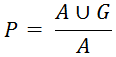
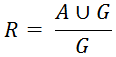
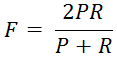
There are five scores that I adopted from Peiszer’s thesis. Three of them are for scoring boundaries: precision (P), recall (R), and F-measure (F). If the number of ground truth boundaries is G and the number of algorithm boundaries is A, then precision, recall, and F-measure are calculated according to the following equations:
 |
 |
 |
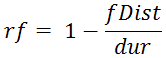
For measuring form or labeling of the algorithm I use Peiszer’s formal distance (fDist) and formal distance ratio (rf). See page 22 of Peiszer’s thesis for an explanation of formal distance. Also, I have written the MATLAB function
Algorithm
The equations for calculating the scores are pretty simple. However, there are many practical modifications of the segmentations that are performed before the sets are used in the equations. Four parameters are used in this process:
Boundary
In preparation for the boundary scores, the algorithm boundaries and ground truth boundaries are cleaned up using the same method. The purpose of this step is to merge boundaries that are very close and reduce the effect of intro/outro fading. Start with either and perform the following tasks:
- Merge all start and end times, sort and remove duplicates.
- For each element, compare it to every other element. If any two are within
PROX seconds of each other, the first item is kept as the boundary and the others are removed. - Find all times within
TOL percent of the beginning and end of the track duration and remove them.
After cleaning up the boundary times, the algorithm and ground truth sets are compared to find the number of intersections. Intersections are counted according to the following algorithm:
- Determine which set is shorter and call it set A, the other is set B. Setting the shorter list as set A helps to ensure that a single boundary doesn't find multiple intersections.
- Starting at the beginning, compare each boundary time in A with every time in B.
- If a time in A is within
WIN seconds of a time in B, an intersection is counted. Stop evaluating this time and go on to next item in A. - If a time in A is not within
WIN seconds of a time in B, go to next item in A. - Repeat step 2 until all items in A have been checked.
Once the number of intersections has been counted, precision, recall, and F-measure can be calculated directly from the equations shown in the Scoring System section. The numbers of algorithm and ground truth boundaries come from the cleaned up sets.
Form
In form evaluation, the two strings for formal distance must be the same length. The preparation for this calculation is to obtain two equal length strings that represent each the algorithm and ground truth sets to be able to compare them using formal distance. This process begins with the original segmentations before the boundary cleanup was performed. To begin, Peiszer obtains what he refers to as timeline segments for each set.
- Merge start times, end times, and time zero. Sort and remove all duplicates. This is set T.
- Starting with the first item in T, scan it with the next item. If they are within
WIN seconds of each other... - Keep the current time and remove the second time.
- Go to the next item in T and repeat this step.
Upon completion of these steps, the result is a modified T is the timeline segments. Let the subscripts A and G distinguish between algorithm and ground truth timelines. The next step is to find a common timeline set U.
- Merge sets TA and TG, sort and remove duplicates. This is set U.
- Starting with the first position in U, compare it to the next position.
- If the times are within
WIN seconds of each other, remove the time in the current position. The list has been shifted and the next time is now in the current position. Repeat this step for the unchanged current position. - If the times are not within
WIN seconds advance to next position. - Do this until the second to last position is reached.
The set U now contains a cleaned up common timeline. Use this set to get the subparts of the algorithm and ground truth segmentations. See Algorithm 4 of Peiszer's thesis on page 35 for obtaining subparts. The basic idea of subparts is to take the union bounds U and assign labels to its segments. Depending on where the labels come from defines whether algorithm or ground truth subparts have been found. Peiszer graphically describes this on page 32. After the subparts have been found, the canonical representation of each set of labels is determined. The canonical representation is a string of single capital letters that represents the labels of the segmentation. The included MATLAB function
Calculating formal distance requires going through all permutations of one of the canonical representations. Songs with many different segment types can take upwards of twenty minutes to score each time. Setting
Code
The provided code uses Peiszer’s evaluation system to compare multiple algorithms at once. The main function is
Instructions
First the
Before running
-
WIN - window in seconds that defines how close ground truth and algorithm boundaries must be in order to be considered a match. -
PROX - any boundary that is withinPROX seconds after a previous boundary is removed as it is considered part of the previous boundary. -
TOL - percentage of the track that is removed from the beginning and end to avoid errors due to intro/outro fading. -
MAX_PERMS - the maximum number of permutations executed when calculating formal distance.
Peiszer does not refer to these quantities by the same name, but his typical values for these parameters are
As
Cell Array S
The returned cell array from
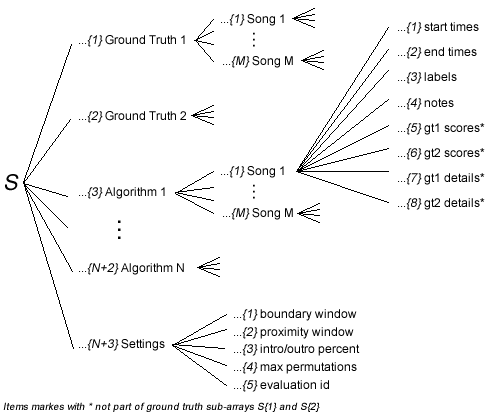
Figure 1
For each song there is a sub array of information, this is depicted in Figure 2. The start times, end times, and labels correspond to information from each segment of the current song and algorithm SegmXML. Other information in S is shown directly in Figure 2. Notably, sub arrays 5 and 6 store scores and sub arrays 7 and 8 store details that were used when obtaining the scores. All of the elements in details should be recognizable after having read the Algorithm section. Items marked with an asterisk(*) are not applicable to ground truth information and are not present in
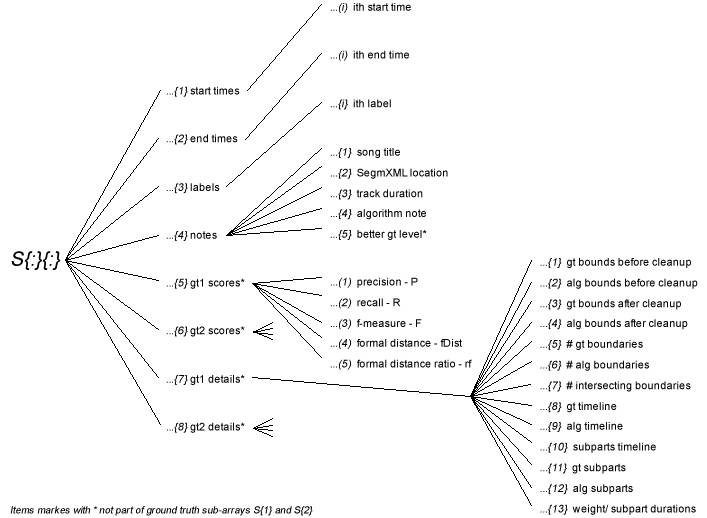
Figure 2
HTML Report
The structure of the HTML report is fairly simple. The Main Summary is a good starting point for navigation. It displays a table where the rows are songs and columns are algorithms. Each cell contains the five scores for that song evaluated with that algorithm. The table can be changed between displaying information compared against main segments and sub-segments by clicking on the tabs at the top of the table. As you will notice in the rest of the pages, there are always tabs that allow you to quickly change between main and sub-level comparisons. Also, scores are often color coded to allow a song's performance to be noticed at a glance.
From the Main Summary you can click on any of the algorithm names to go its summary page. The Algorithm Summary page shows every song evaluated at both levels for one specific algorithm. Scores, details, and timelines are viewable here. By clicking on the 'song page' link next to any track you will be directed to the song page. This can also be reached by clicking on the track names on the Main Summary page. The Song Summary page similarly shows information for both levels of evaluation. However, results for all the algorithms are viewable here. While the scores and timeline are displayed here, there are no details on this page. Many links are on the pages to make navigation quick and easy.
Example
I have included the results from an evaluation that I ran. This example is for 15 songs, two algorithms and uses the settings
Click here to go to my example HTML report.
Downloads
summary.zip
Includes all MATLAB code and HTML files required to generate the report.
segmxml.zip
Segmentation files for my results using Peiszer's algorithm, Peiszer's published results extracted from his website, and ground truth data for the 15 songs used in my example.
